Home Donate New Search Gallery Reviews How-To Books Links Workshops About Contact
Canon
5D Mark II
Full-Frame 21MP (2008-2012)
Replaced by the 5D Mark III.
© 2012 KenRockwell.com. All rights reserved.
Intro Specs Performance Compared Usage Recommendations
Diagrams What's New What's Old Sales Fluff Lenses Video

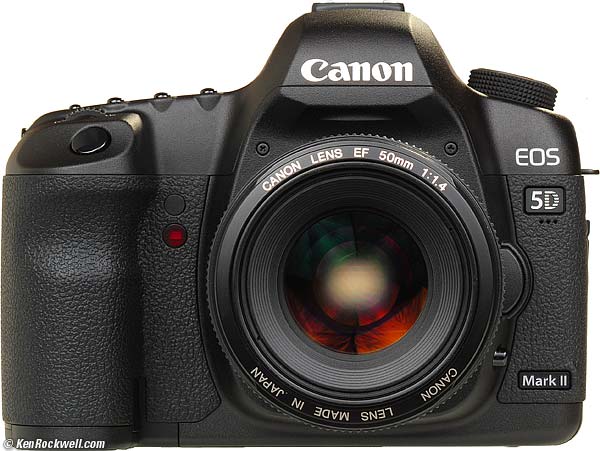
Canon EOS 5D Mark II and 50mm f/1.4 (32 oz./907g with battery and card, but no lens). enlarge. I got this one at Adorama (body only, kit with 24-105 IS or all possible configurations). I'd also get it at Amazon, J&R (body only or with 24-105IS) or Calumet. It helps me keep adding to this site when you get yours from these links, thanks! Ken.
Adorama pays top dollar for your used gear, especially the older model 5D.
October 2012 Canon 5D Mark II Deals
Canon 5D Mark II body-only: $1,782.
Canon 5D Mark II with 24-105 IS: $2,499.
Add this printer to your order, and get an extra $400 rebate.
NEW: 2012 DSLR Comparison 18 April 2012
NEW: High-ISO Comparisons of the Nikon D1, D3 (D700), D4, D800, D7000 and Canon 5D, 5D Mark II, 5D Mark III and Fuji X-Pro1 and X100 06 April 2012
NEW: Canon 5D Mark III 02 March 2012.
Canon 5D Mark II One-Day only sale
Save yourself $1,300 over the 5D Mark III and get the excellent 5D Mark II from stock:
$300 price drop to $2,199: Canon EOS-5D Mark II Digital SLR Camera Body, 21.1 Megapixels with 3.0" TFT LCD - USA Warranty.
$2,999.00: Canon EOS-5D Mark II Digital SLR Camera Body Kit with Canon EF 24-105L Image Stabilized Lens.
March 2012 More Canon Reviews Other reviews
DEALS: Canon 5D Mark II discount KIT and 5D Mk II and 24-105mmm f/4 L discount kit.
Which makes better Images: 5D Mk II or D7000? 14 December 2011
Canon 5D Mark II Mode-Dial Lock Modification.
If you want, you can pay Canon $100 to add a lock button in the middle of your mode dial so that the dial doesn't move unintentionally.
Nikon D7000, D300, D3 (D700) and Canon 5D Mark II High ISO Comparison 08 November 2010
Canon 5D Mark II Users Guide, in Plain English
Direct Comparison of Canon 5D Mark II, 7D, 5D and Nikon D300 at the Test Range 03 August 2010
Sample Images From New York City May and June 2010
Canon 5D Mark II Sample Images from Maui May 2010 (show these to your wife, and she will not only allow you to get your 5D Mark II, she'll insist!)
Canon 5D Mark II Sample Images from Yellowstone August 2009
Nikon D700 versus Canon 5D Mark II 08 June 2010
Introduction top
Intro Specs Performance Compared Usage Recommendations
Diagrams What's New What's Old Sales Fluff Lenses Video
I use Adorama, Amazon, Ritz, B&H, Calumet, J&R and ScanCafe. I can't vouch for ads below.
|



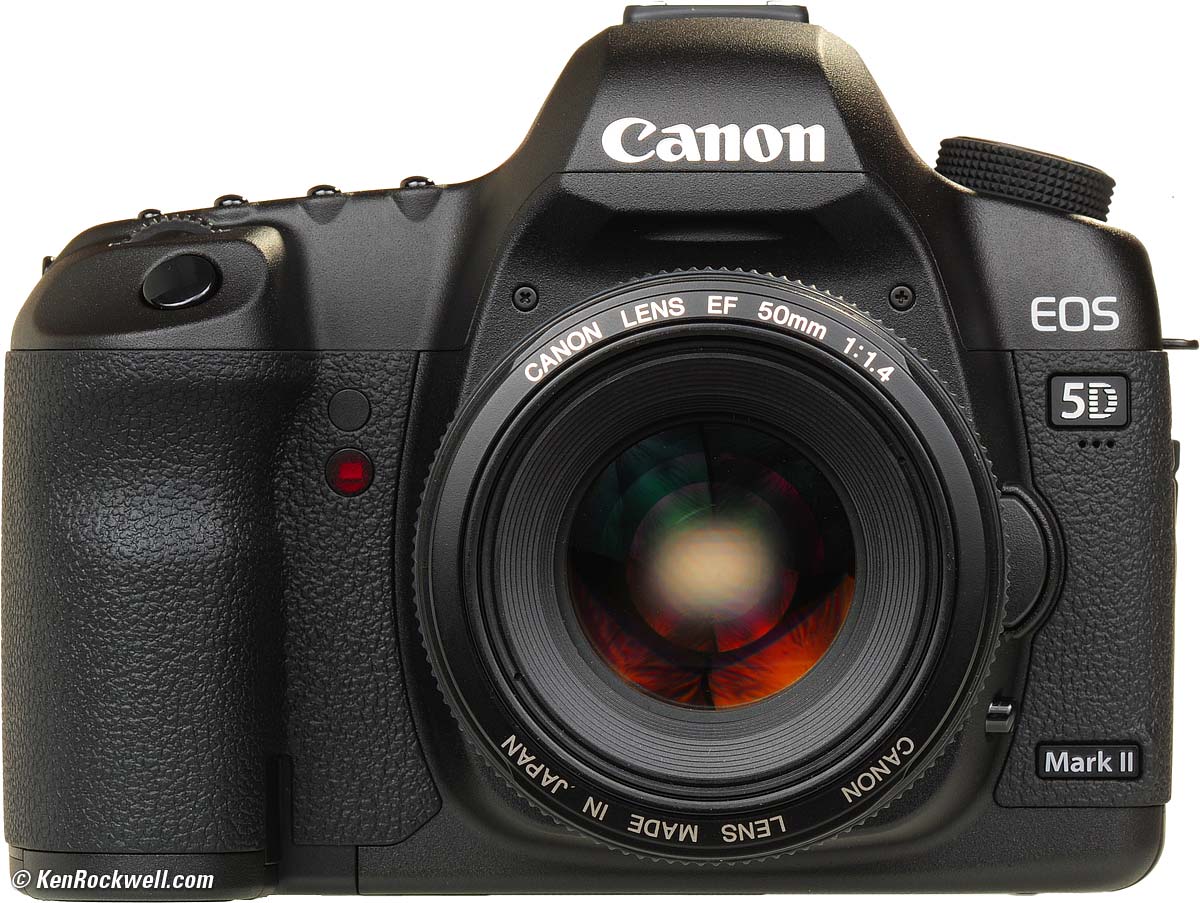
The Canon EOS 5D Mark II is the best digital SLR ever made by Canon.
Its light weight and ultra-high technical performance have made it the first choice for outdoor and landscape digital shooters who have to carry it all day.
As of May 2011, Version 2.09 is the latest firmware.
Light Weight top
Not only does the technical performance of the Canon 5D Mark II far exceed Nikon's D700, D3 and D3s full-frame cameras, the 5D Mark II weighs much less than any of them! The 5D Mark II weighs the same as Nikon's DX D300s.
Sure, the Nikon D700 or D3X feels much tougher when you're playing with it indoors, but when you have to carry it around your neck all day, the more plasticy 5D Mark II excels. I enjoy carrying the 5D Mark II all day and night, but I'd be looking forward to dropping the metal D700 or D3s back at the hotel as soon as I could at the end of a day. With the 5D Mark II, I enjoy carrying it everywhere, and thus get more great pictures because it's with me, and not left at home.
Multi-Task Shooting top
The 5D Mark II is also the world's best camera for when you're shooting more than one kind of thing. If I'm shooting in Yosemite Valley, and suddenly my kids do something cute, I can keep my eye on the finder as I turn the camera, and in one click of the mode dial by feel, I've reset everything about the 5D Mark II to my own preset settings for for kid's action pictures, as opposed to the settings I was using a second before for grand landscapes.
Sure, if all I shot were sports, news or action, the Nikon D3s is a much faster, tougher professional camera with better low-light AF in the corners for twice the price, and if all I did was shoot in a studio all day the Nikon D3, D3s or D3x are better because they allow easy in-camera 4:5 cropping, and if all I did was shoot in very low light even the D700 has better autofocus when using the side AF sensors, and if just want family pictures, the D40 weighs even less, but when I want take one camera to do the work of all these at the same time, the Canon 5D Mark II is unbeaten.
The 5D Mark II is more than fast enough for action shots of family, it doesn't weigh much, and it has unbeaten technical full-frame performance. You can't get this combination anywhere else.
No Nikon at anything less than three times the price comes close to the high technical image performance of the 5D Mark II. For nature and landscapes, the 5D Mark II is way better than anything from Nikon at even three times the price, and even if someone gave me an $8,000 Nikon D3X, it's so heavy that I wouldn't want to carry it all day out in the woods.
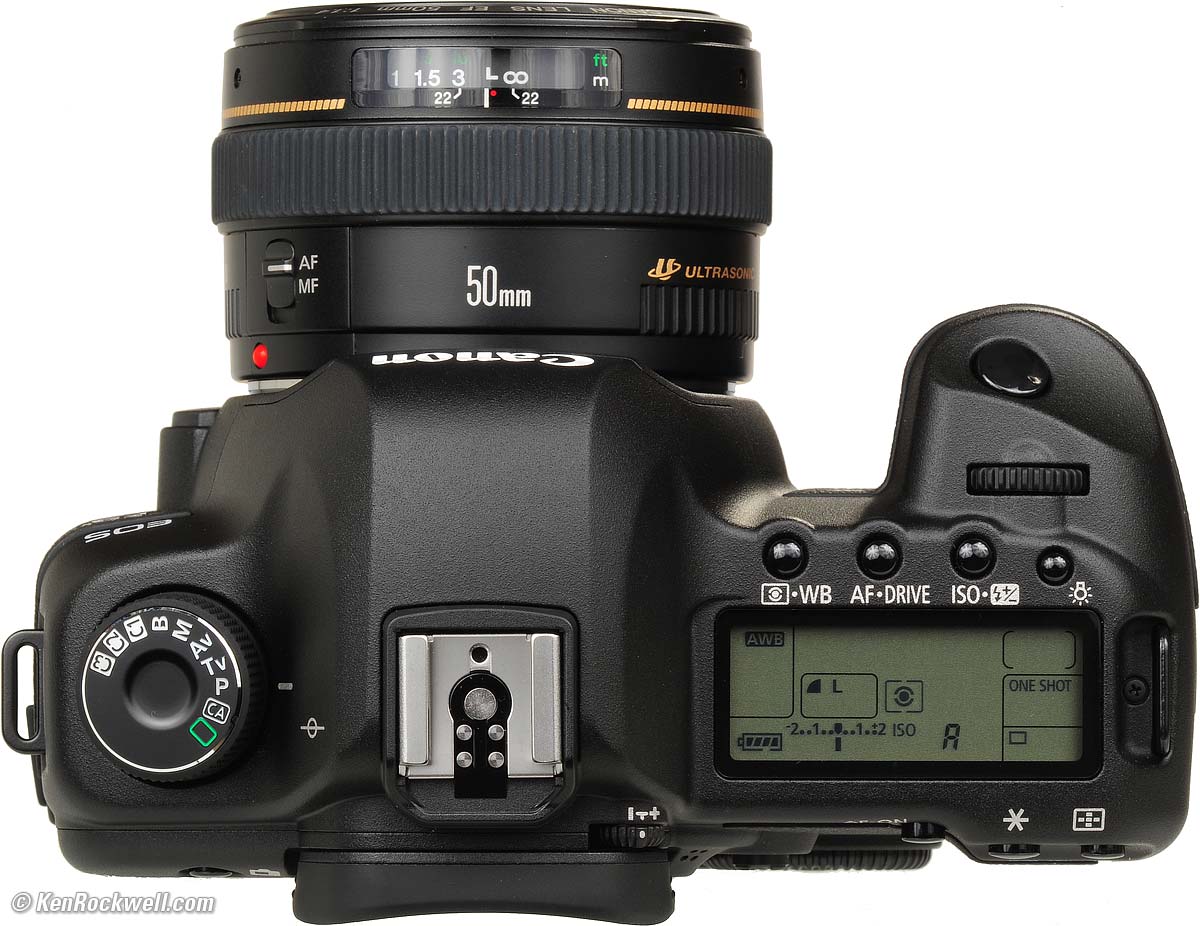
Top, Canon 5D Mark II. enlarge.
The reason the 5D Mark II is so flexible is because it has three programmable Total Recall positions on its top mode dial: C1, C2 and C3. Think of these as Camera 1, Camera 2, and Camera 3.
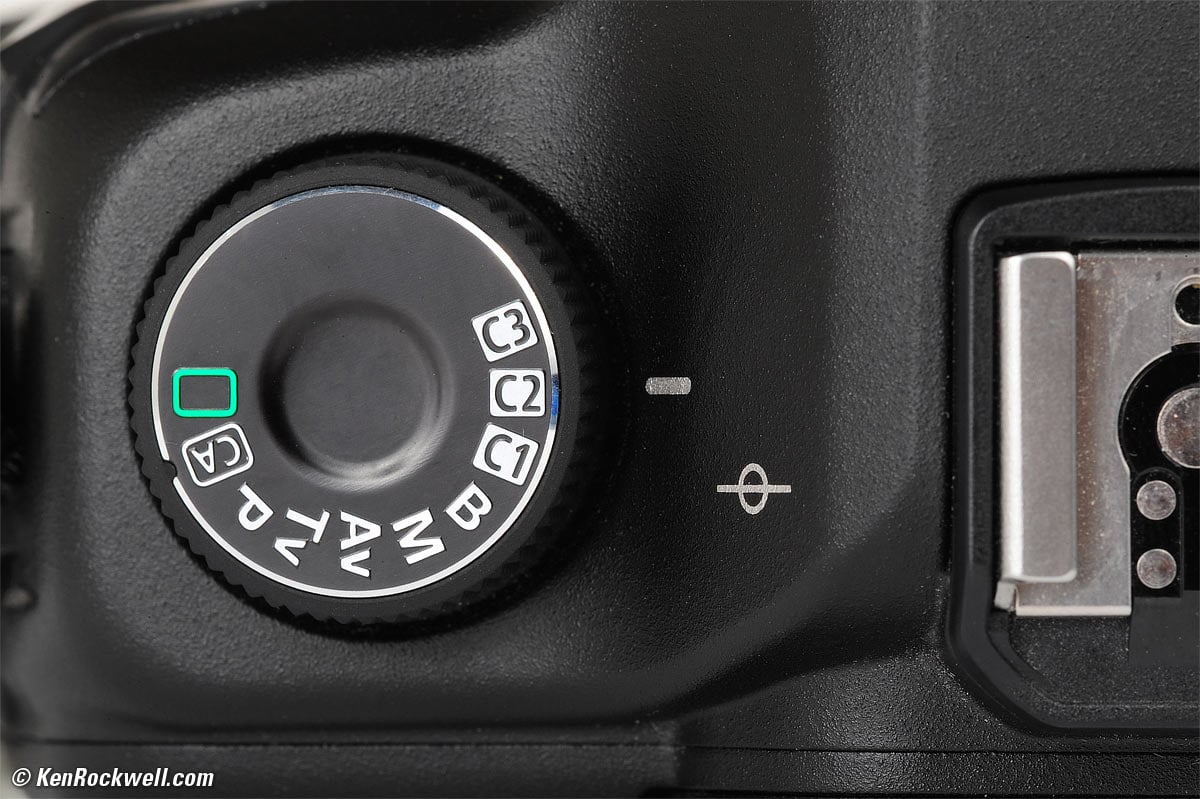
C1, C2 and C3 Total Recall positions. bigger.
Each easily can be programmed to recall everything about how you have your camera set: sharpening, color, saturation (and every setting for every one of the nine presets in the Picture Controls menu), self timers, LCD brightness, time-out settings, autofocus settings (modes and sensors selected), P Tv Av M exposure modes, resolution, file format(s), advance, metering, exposure compensation(s), white balance, WB tweaks, how many files the playback jumps when you move the top dial, everything in every menu, everything. The 5D Mark II instantly changes all of its settings as you click from one C setting to the other.
If you reset a few things to something screwy and want to return to your preset preset, simply turn the knob away and back to the C setting you desire, and it's all as you preset it. You can select these by feel without taking your eye from the finder. If you set something screwy for one shot, don't worry: after the camera times-out in about a minute (also selectable in a menu), when you wake it for the next shot, it's back where you preset it. Never again will you make the first shot of the day at ISO 12,800 and 2,500K WB from the night before.
Nikon has nothing similar, which is why I have to use two Nikons to do the same thing. I use one Nikon for my family pictures, and a second in my studio because Nikon's settings banks don't recall everything, and they take about twelve button pushes to recall those memory bank settings each time. With the 5D Mark II, everything is reset as I need it with but one click of the dial. The 5D Mark II is thus three cameras in one!
I'd gladly trade the toy-store settings, [AUTO] and [CA] to be C4 and C5.
I set my C1 position for general high-resolution photos in any light with one-shot AF, highlight optimization, LARGE JPG, auto ISO, high saturation, A5 tweaked AWB and more.
I set C2 for shots of my family: all-sensor AI auto focus to catch and track action, Auto ISO and highlight optimization, not as much saturation, and the SMALL JPG setting which is still more than enough for great 20x30" prints.
I set my C3 for serious daylight shots: fixed ISO 50, no highlight optimization, -2/3 exposure compensation, LARGE image size, +3 saturation, one-shot AF, and more.
If you're following me, one click gets me my entire slew of settings in an instant to catch nature or to catch family. Maybe you'd use one setting for night shots, since the 5D Mark II also recalls the LCD brightness and long-exposure NR settings. Maybe you'd set one for motorsports at a high ISO, Tv exposure mode and no Image Review. With my Nikons, I'd lose a minute each time resetting a zillion menu items since Nikon's settings banks still take a dozen button pushes to recall, and since they don't recall everything, I'd still have to set other things like Image review ON/OFF and AF settings each and every time I want to shoot something different.
See also How to Set the Canon 5D Mark II's Total Recall Modes.
Eternal Battery Life top
Battery life? You mean the 5D Mark II has a battery? I get about 1,000 - 1,500 shots on a charge. I doubt you'll need a spare.
Great LCD top

Canon 5D Mark II. enlarge.
The LCD is the best ever put on a Canon SLR. The illustration above can't do it justice, because the 5D Mark II's LCD has a much higher resolution and much more brightness than the computer on which you're seeing this image. (This illustration shows an image filling the screen, while a firmware defect in the actual 5D prevents this, and instead always shows exposure data along the top, even when zoomed.)
Its accurate: it matches my calibrated Apple monitor so I can make critical tone and color evaluations on it.
It's also able to go super-bright to be visible in daylight. Don't turn it up that far all the time since it will blind you indoors, but when you need it, it screams.
It's anti-reflection coated for high contrast.
There is no condom over it as Nikon often uses. I haven't had a ny problems with wear.
Best DSLR setting ability top
The 5D Mark II can be set so that one tap of the SET button wakes up a control screen on the rear LCD, from which we can control everything with the dial, joystick and SET button. This just made obsolete the top-panel LCD and those tiny little setting buttons, and no more menus for setting shot-to shot parameters.
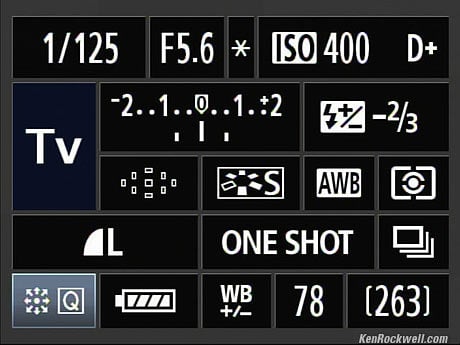
Canon 5D Mark II Quick Control Screen.
To do let your 5D Mark II call up this screen via the SET button, press:
MENU > CAMERA••••• (C.Fn) > C.Fn IV Operation/Others > SET > 3: Assign SET Button > SET > 5: Quick Control Screen > SET.
This feature is so life-changing that it means I never have to look at the top LCD. Canon should have saved themselves $4 and left off the top LCD and the buttons around it.
It's even better than you think. Hit SET to call it up, highlight what you want to change with the thumb button, and spin the big dial to change the setting. You're done; there's no need to hit OK or DONE or EXIT; as soon as you've changed it with the big dial, you're set.
Technical Quality top
To quote Canon's original 5D Mark II press release, "The EOS 5D Mark II achieves the highest level of image quality of any EOS Digital SLR released to date," which means better than the $8,000 1Ds Mark III.
All these great ergonomic items might make me forget what most people find exciting: the incredible resolution of the 5D Mark II, unbeaten in any digital camera at less than three times its price. We are very lucky that the 5D Mark II is not that expensive, and weighs so little. This is which is why it's so wildly popular with digital nature and landscape shooters, who are usually shooting only one thing at a time.
Performance top
Intro Specs Performance Compared Usage Recommendations
Diagrams What's New What's Old Sales Fluff Lenses Video
Finder
The finder is bright and sharp and clear.
The standard screen is optimized for lenses of f/2.8. Faster lenses are no brighter, and you can't see the actual narrower depth of field of faster lenses. For that, you need optional screens.
The digits at the bottom are smaller and thinner than my taste, I prefer the fatter, brighter ones in Nikons. The Canon display is dimmer than I'd prefer in daylight, and it's fine in low light.
The finder shows a multitude of things, including ISO and the ISO chosen by Auto ISO, but one item curiously absent is ISO when you are attempting to set it. To set ISO (or preview the selected Auto ISO), sadly you have to take your eye from the finder and look at the back or top of the camera.
Autofocus top
AF works great under almost all conditions, except light so dim that I can't read, under which condition it gets slower.
There is no AF Illuminator, and the 5D Mark II rarely needs it.
There is a simplicity to Canon's 9-point AF system lost on Nikon users: the thumb controller has 9 positions, so you can select any AF point in just one push. You never have to click around to get where you want. For instance, if you have the left sensor selected and want the right sensor, just click right. On Nikon, you'd have to click right twice. Want the bottom sensor? Just click down from wherever you are.
Want to use all the sensors? Push the top right button on the back of the 5D Mark II; no menus required for any of this. Unlike the 51 AF sensors with real facial recognition in Nikons, the all-sensor position of the 5D Mark II isn't very smart. It won't focus automatically on eyeballs, it tends to focus on whatever's closest.
AF Fine Tuning
It works, but don't touch it unless you really, really know what you're doing.
Good news: the files record this setting in the EXIF, and the 5D Mark II displays the set values on playback.
Only about one out of 20 lenses requires any fiddling here. I'd leave it alone!
Speed top
The 5D Mark II has an amazing capacity to generate data. It flies along at close to 4FPS at full resolution, and never gets hung-up computing or storing data. It makes the kludgy LEICA M9 look like the turkey it is when it comes to working on data.
Likewise, the 5D Mark II can fly through images on playback at amazing speed, in a completely better realm than the klunky LEICA M9.
Autofocus is faster than my kids can run, which is pretty fast!
If anything, the 3.9FPS rate is too fast, and I wish the 5D Mark II had a menu setting to give a Cs rate of about 3 FPS. Since the 5D Mark II only runs at Ch, I often fire two shots when I really only wanted one.
Exposure top
My 5D Mark II gives great exposures. I usually get the best results without any exposure compensation.
I'll dial-in -0.7 if I'm shooting colorful things in interesting light with highlight optimization (Highlight Tone Priority) OFF, otherwise, 0.0 usually looks best.
I look at my LCD and season to taste if needed.
Auto ISO top
Auto ISO is one setting among the ISO selections.
Auto ISO isn't programmable or changable, but it's also much smarter than the Auto ISO in Nikons. With the 5D MArk II, you use Auto ISO as it is, or you use something else.
In the 5D Mark II, Auto ISO knows your lens focal length, and automatically varies the lowest shutter speed accordingly.
Auto ISO also has a "soft landing" feature. Instead of staying at the lowest ISO until the slowest shutter speed is hit as does Nikon, Canon's Auto ISO starts ramping up the ISO before the shutter speeds start approaching the slow limit.
Auto ISO is programmed to use slow speeds 1/3 stop slower than 1/focal length.
Canon's inviolate slow speed limits in Auto ISO are those you'd pick for still subjects, but not for action.This is fine for most work, but too slow for shooting action, where I set my Nikons to 1/125 slowest speed to stop my kids' action indoors.
With a 50mm lens, Canon's Auto ISO tries to keep you at 1/40 or faster.
At 70mm and 100mm, it's 1/80, and at 200mm, it's 1/160.
At 35mm it's 1/30, and at 16mm, it's 1/15.
Since Canon's Auto ISO can't be altered, it's useless for shooting action with wide and normal lenses. unless you shoot in Tv mode.
Canon's Auto ISO still isn't smart enough to know if you have Image Stabilization switched ON or OFF. Canon's point-and-shoots are smart enough. Drats!
Auto ISO works even with Highlight Tone Priority ON, although of course it starts at ISO 200 instead of ISO 100.
When shooting flash, Auto ISO always selects ISO 400.
Flash top
The 5D Mark II is smart with flash. If your flash hasn't yet recycled (no ready light), it will seamlessly shoot exposing for ambient light, and the instant the flash comes up, will shoot based on the flash. The EXIF is coded correctly as well for whether or not the flash was part of the action.
The flash exposures were great. I used an old 220EX for fill-flash, and occasionally as the key light, and automatic exposures were usually quite good.
The slow 1/200 maximum shutter speed with flash (sync speed) is inefficient for fill-flash in daylight. It makes me yearn for my Nikon D40's 1/500 sync.
By inefficient, I mean that too often my flash runs out of power, or takes longer to recycle, than it would have if the 5D Mark II had a faster flash sync.
The trick high-speed sync modes are just gimmicks, and are manual-exposure, and waste even more flash power. They don't really work on any camera.
LCD top
As mentioned at the top, the bright, sharp and contrasty anti-reflection-coated LCD is excellent.
It is very accurate. I don't notice any difference between the back of my camera and my calibrated Apple monitor.
If you crank it up, it's blinding and easy to see in daylight, and you can turn it down when shooting outdoors at night, so you don't accidentally underexpose.
The automatic brightness feature drives me crazy, because it dims the screen as I turn to put the camera in my shadow. I set a fixed brightness by pressing:
MENU > WRENCH •• > LCD Brightness > Manual > SET.
I put this item in my MY MENU menu so I can change it for direct sunlight or total darkness.
Top LCD top
With the Quick Control screens, the top LCD is merely vestigial for setting the camera, but I find it annoying that when the camera is asleep, it is completely blank.
I prefer the top LCDs of Nikons which usually show basic settings or shots left, even when asleep. For instance, the top LCD of even my Nikon D70 shows "26.2k" images left on my partially-full 32GB Lexar 600x CF card, even when it's turned-off! Even if the Canon's LCD worked when idle, it still only would show "999."
The Canon 5D Mark II top LCD is completely blank when it's asleep.
Technical Image Quality top
General
The 5D Mark II is among the world's highest-image-quality 35mm-based DSLRs.
Any image defects you see are most likely due to your own lack of expertise.
Few lenses are as good as the 5D Mark II, so most of the time you'll be seeing limitations in your lenses more so than limitations of the 5D Mark II.
For example, Canon's state-of-the-art 16-35mm f/2.8 L II is the best lens of its kind, and on the 5D Mark II, you'll see every one of its optical limitations in excruciating detail.
Color top
As expected, colors look wonderful.
I tend to photograph most things at +3 saturation, and people at +2 saturation, in the Standard Picture Style.

Flowers. 1/80 at f/7.1,hand-held Canon 5D Mark II, ISO 50, Cloudy WB + A5 trim, Canon 50mm f/1.8. Standard picture style with +3 saturation. Camera-original JPG (4.7MB).
In the original image, you can see that they're fake flowers. Note how clearly you can see the depth of field with a lens this sharp.
At +3 saturation, things lit by warm evening sunlight tend to take off and get even more vivid, sort of like Velvia, but they shoot more towards a vivid yellow than go redder.
I'm especially impressed at how good the 5D Mark II usually looks at my default Auto settings, even in poor light.
Here's Katie in window light, watching TV:

Katie in Maui, window light. Original file (3.3MB).
I shot this at my usual AWB with more amber (A5 WB SHIFT), Auto ISO chose ISO 400, Highlight and shadow tweaks ON, Standard and +2 saturation, 100mm f/2 USM, f/1.8 at 1/80. (paper-thin depth-of-field at 100mm and f/2, only one eyelash on one eye is in focus.)
I'm impressed at how great her baby skin looks, and the colors of her clothes are bright, too, and this is exactly as they came out of the camera in JPG — no raw whacking needed.
Even better, when the auto settings don't give good results, it's easy to tweak the white balance, contrast and saturation to get what I want, fast, even under mixed artificial light, by looking at the LCD and seasoning to taste.
I'm impressed at how easily I can pull good results out of horrible mixed lighting conditions.
I made this shot by tweaking the custom WB SHIFT to add 5 units of magenta, and the green went away:

Maui Bathroom: Mixed CFL and halogen lighting bigger.
The mirror looks green, but that's the color of the glass. I have more details at my Canon 5D Mark II User's Guide.
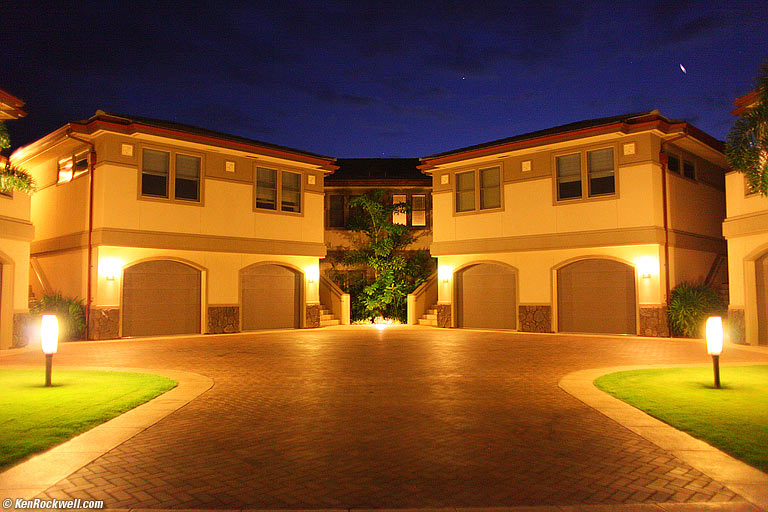
Ho'olei. bigger. 28mm f/1.8 at f/1.8, hand-held 1/10 sec, ISO 3,200.
This night shot (the dot in the sky is a planet) was made at my default settings in full auto: point and shoot. White balance was Auto and A5 trim, Auto ISO grabbed ISO 3,200. Picture Control was standard, except for my personal default of +3 saturation, and highlight and shadow tweaks were on. Of course I shot in Program mode, which picked apertures and shutter speeds for me.
Auto White Balance top
Auto WB works great.
Like most DSLRs, it's too orange under most tungsten, so set it manually.
Resolution top
The Canon 5D Mark II has a lot of resolution. You need great lenses to take full advantage of the full resolution of the 5D Mark II.
If you split pixels, you will be wanting to shoot Canon's fixed (prime) lenses and leave your zooms at home.
The 5D Mark II is so good that it has more resolution than most of Canon's medium and wide zooms, especially if you worry about the corners.
Out-of-the-camera JPGs have the usual cartoonish Canon look: edges are sharp, but textures are softer. I lessen this by shooting at ISO 50 and turning off High ISO NR, which lessens the softening of textures enclosed by edges.
Sharpness of Smaller (M and S) Image Sizes top
Excellent!
As hoped, lower resolution files get sharper because Bayer Interpolation is no longer needed.
This is much better than Nikon, whose images don't get any sharper at 100% when set to smaller resolution like MEDIUM and SMALL.
On the 5D Mark II, MEDIUM and SMALL files are super, duper sharp.
I don't need 21MP. I usually shoot set down to 11MP (Medium) and get images much sharper than from 12MP (native) cameras, like the Nikon full-frame cameras.
For family photos, even the 5D Mark II's SMALL (5MP) setting is plenty for making great 20 x 30" prints, since its 5MP setting has about the same sharpness as an 8MP (native) camera.
Noise top
Sadly, there is often visible noise in the shadows at ISO 200 and above. It's only about as good as Nikon's DX (small-format) D300 with it's Adaptive Dynamic Range turned on.
ISO 100 is cleaner, and ISO 50 is even cleaner.
See Canon 5D Mark II Comparisons for actual examples and comparisons to other cameras at high ISOs.
Even with High ISO NR turned off, it still softens details at higher ISOs. So? It works great at ISO 3,200 when you need it.
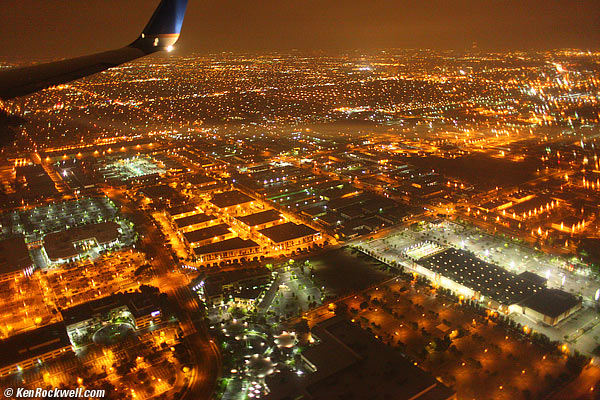
California at 250 knots. 28mm f/1.8 at f/1.8, hand-held 1/25 sec, ISO 3,200.
This shot out an airplane window was made at my default settings in full auto: point and shoot. White balance was Auto and A5 trim, Auto ISO grabbed ISO 3,200. Picture Control was standard, except for my personal default of +3 saturation, and highlight and shadow tweaks were on. Of course I shot in Program mode, which picked apertures and shutter speeds for me.
Long Exposures top
I get great results with 30 second exposures, even without using the time-wasting Long Exposure NR mode.
Sensor Dirt top
I've had a 5D Mark II for 18 months and made just over 10,000 shots on it.
I change lenses a lot as I test them.
I have yet to have any visible dirt; the self-cleaner seems to be doing its job.
Lateral Color Fringes top
Unlike every current Nikon DSLR, the 5D Mark II has no ability to correct lateral color fringes.
Therefore most Canon lenses will show color fringes in the corners.
If this bothers you, use DXO software, shoot Nikon, or try some of Canon's best lenses, like the inexpensive 50mm f/1.8 II, and avoid all wide lenses and medium zooms.
Shadow Lightening ("Automatic Lighting Optimizer") top
It works well as needed, and leaves things alone if not.
I explain it on my Canon 5D Mark II User's Guide.
Highlight Recovery ("Highlight Tone Priority") top
I show examples of this on my Canon 5D Mark II User's Guide page.
It rarely makes any difference, however because it forces the 5D Mark II to shoot at at least ISO 200, often shadow noise is increased visibly compared to ISO 100 or ISO 50.
Peripheral Illumination (Vignetting) Correction top
This works great in the 5D Mark II.
The results are obvious with the 50mm f/1.4 USM at f/1.4. With the correction turned on, which it is by default, the frame is evenly lit, instead of highlighted in the center.
Not all lenses have their data stored in the 5D Mark II. For some lenses you'll need to fiddle with a computer and the Internet to download them. I haven't bothered trying.
Video top
Video capture is part of Live View. You can choose the Picture Style set for Live View to adjust sharpness, contrast, color saturation and white balance.
The rear LCD can be matted with a semi-transparent border to match the aspect ratio you've chosen.
I don't care about DSLR video.
Sample 1080p/23.98 video file (six seconds, 40MB .MOV).
Mysterious Occlusive Black Pixels top
Tweakers managed to break the first version of the 5D Mark II and get some blacker pixels on the edges of blown-out highlights. See black rings around Uranus.
Canon fixed this with a firmware update about a week after this was discovered way back in 2008.
Ergonomics top
Grip and body
The 5D Mark II looks nice, but it is not as well sculpted to our hands as are Nikons. It's not that obvious as you look at each camera, but Nikons are sculpted to fit and feel perfect, while the 5D Mark II looks prettier, but its squarer surfaces don't fit or feel as good.
The 5D Mark II becomes uncomfortable after hours of shooting as pressure points make themselves obvious.
Canon 5D Mark II is designed for baby-sized hands. I have to pull-in my big American fingers and thumb to hit buttons, unlike a Nikon F5, which is designed for adult hands.
The grip is also too small; my fingertips are always hitting the front of the body as they wrap around the grip.
The 5D Mark II is covered in hard fake rubber. It is harder, more slippery and less comfortable than Nikon's rubber coverings.
2-Dimensional Show-Everything Menu System top
The 5D Mark II's menu system is much better designed than Nikon's outdated, overgrown one-dimensional system.
On the 5D Mark II, you use the thumb button (or top dial) to select which of several menus you want horizontally, and then all those menu choices fit on the screen. To go down the list, use the rear dial or the little thumb button, and hit SET to play with them.
Crummy Power Switch top
The power switch is awful. If you carry the 5D Mark II around your neck with a strap, it will get knocked by your belt.
Thus often when you draw your camera to fire, you'll discover that it's either turned itself off, or more common, has disabled the rear control dial.
You Have to Hit PLAY top
Like all Canon cameras, a firmware defect still forces us to have to hit PLAY before we can zoom a just-shot image, or swap to other images when an image pops up immediately after we've shot it.
Worse, the PLAY button is on the other side of the camera, so you need a second hand to hit it. Thus the Canon 5D Mark II cannot be shot one-handed very well.
The Canon Digital Rebel T1i does this better: at least it has its play button where you can hit it with your shooting hand, even if you still have to hit it to do anything with an image just shot.
Nikons don't play this game with us; when an image pops onto a Nikon LCD after shooting it, you can zoom, scroll and select other images without ever having to press PLAY.
Depth-of-Field Preview Button Still in the Wrong Place. top
I kid you not: you need to use a second hand to hit the depth-of-field preview button!
You need to use your left hand to press it.
Nikons are superior; you can use your one shooting hand to hit theirs.
Power, Chargers and Batteries top
Battery Life
Charge life is extraordinary. Each little battery gives me between 1,000 and 1,500 shots.
If you can recharge each night, you probably don't need a spare.
The little battery icon has more than enough segments to tell you what's going on, even in the viewfinder. If you need more information, here's the screen you can call up in the menus:
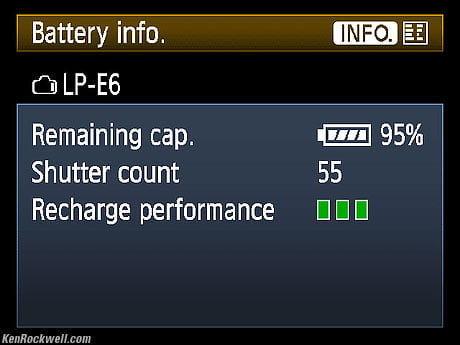
Canon 5D Mark II Battery Info screen.
Charger
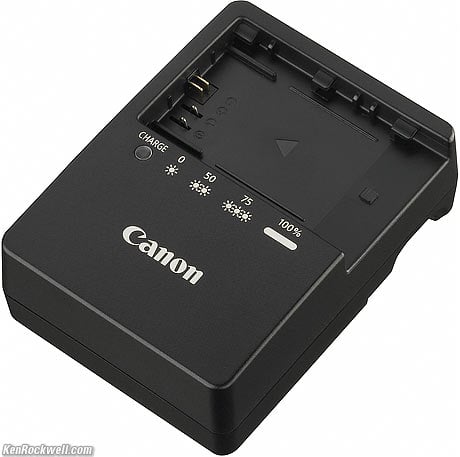
LC-E6 Charger.
The charger is wonderful.
My USA version needs no cord: the plug flips out of the back of the charger.
It charges very quickly, not more than a couple of hours for a totally dead battery, and it has a superb two-color light that blinks orange to tell you the percentage of charge, and turns green when full. Nikon is still tn years behind Canon here.
For a partially discharged battery, it will be done before you finish lunch.
Battery Data
I don't know why I'd care, but the 5D Mark II can remember different batteries by their internal serial numbers, and show this screen with all that's remembered:
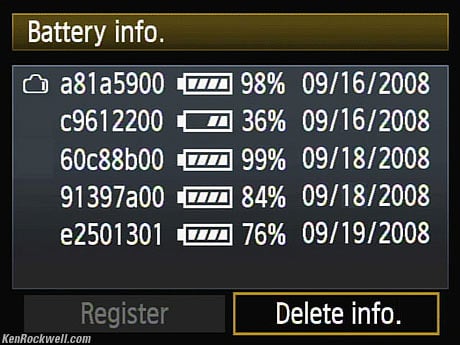
Canon 5D Mark II Battery Info screen.
The one at the top is the one in the camera, and the others are what you've registered and used before, along with their charge states when you removed them.
Data top
File Size
Shot at LARGE NORMAL, files are about 4 MB. They'll be as much as 8 MB if you've filled the frame with sharp detail, and 3 MB or less if much of the image is blank sky or clouds.
Small NORMAL JPGs are about 1 MB each.
Most people shoot at LARGE FINE, which is the default. These files will be larger, but since I can't see any difference, I shoot in NORMAL and save hard drive and CF space.
The 5D Mark II is so smart that it knows that shots made at higher ISO will have larger JPG file sizes due to the additional noise, and you'll see the shots remaining count drop as you increase the ISO. Yes, you get more JPG shots at ISO 50 than you do at ISO 100.
File Numbering top
The 5D Mark II is fairly stupid when it comes to sticking a card in it shot on another cameras.
Poke in a card that's been shot on Nikon, and the 5D Mark II starts recording into the last Nikon folder, numbering its files just after the last Nikon shot!
If the 5D Mark II were smarter, it would create a new folder for itself, and number from wherever it last left off.
For instance, I took a card out of my well-worn Nikon D3 and popped it into a brand-new 5D Mark II. The last Nikon shot on the card was as DSC_4175.jpg.
The virginal 5D Mark II started at IMG_4176.jpg, in the same folder.
Duh.
I had to format the card, make one shot, put the card in my Mac, renumber the one file back to IMG_0001.JPG, and stick it back in the 5D Mark II to get the 5D Mark II back on track.
JPG Compression top
As usual, it uses smart compression to vary file size as each image needs it.
Default JPG DPI
JPGs come out of the Canon 5D Mark II set at 72 DPI. I love this, since it means all my fonts come out the right size for Internet use.
Auto Rotation top
No camera actually rotates the images. Most cameras, including this one, just set a flag but don't rotate vertical images.
I then have to rotate the actual pixels in iView's lossless rotate, so that the images read correctly in every possible application. It won't matter when you print, but if you use your images as many places as I do, you must make sure that they don't come out crooked on anyone's computer or TV.
The 5D Mark II comes one step closer to correct: it's the first camera I've seen that rotates its embedded thumbnails automatically.
Unfortunately, this still isn't good enough. I still have to rotate the actual JPGs, and when I do, iView dutifully rotates the embedded thumbnails back to crooked. Oh well; at least iView can do lossless rotation; amateur programs like Lightroom don't have that ability; they leave your files unrotated and leave you dependant on using smart software like Adobe which knows to read the flags.
What is dumb software that can't read these flags? Your Internet browser. Post a camera-original JPG online, and it usually reads crooked in a browser, for instance.
EXIF Data top
The 5D Mark II doesn't encode the EXIF in a way that iView can read in Auto ISO. They all read as ISO255.
Manually set ISOs read fine. Even ISOs too obscene to display in the viewfinder, like H1 and H2, read as ISO 12,800 and ISO 25,600 in iView.
These ISOs do read properly in the INFO screen during in-camera playback.
Room for improvement top
Please don't make us press PLAY top
Please, Canon, let our cameras allow us to zoom and swap images right after we take our pictures, without requiring us to press the PLAY button first. This slows us down, and makes it very hard to shoot with one-hand since the PLAY button demands a second hand.
The menu option to assign the SET button to be a PLAY button isn't acceptable, because I program my SET button to access the Quick COntrol panel.
Please fix the power switch top
The power switch, on the bottom edge, needs a redesign.
It constantly turns off my 5D Mark II, or at least disables my command dial, as I carry the 5D Mark II around my neck, so almost every time I draw it to my eye, I have to take my camera away from my eye and fiddle with the switch.
Nikon does this right: their power switches are concentric to the shutter button so they never get knocked, and they are easy to turn by feel with your camera as you're shooting.
Canon needs either to move the switch, or add a clever interlock so it never moves by itself. Sadly, it is already fairly stiff (much stiffer than Nikon's), but its defective placement right on the bottom edge of the camera ensures that it always gets knocked.
Otherwise, the 5D Mark II really hits it out of the park. I've got some more whining under What Still Sucks about the Canon 5D Mark II, but they are just my usual grumbling. There are no perfect cameras, except for the discontinued Mamiya 6 and today's Mamiya 7, and possibly the LEICA M3.
Recommendations top
Intro Specs Performance Compared Usage Recommendations
Diagrams What's New What's Old Sales Fluff Lenses Video
The Canon 5D Mark II is the world's best DSLR for nature and landscape shooting because its technical performance is as good or better than competitive cameras that cost up to three times as much, and because it weighs so much less than other full-frame DSLRs. Even if you spend three times as much for the even smaller LEICA M9 with similar resolution, the Canon 5D Mark II's colors are much better.
When you're in the woods all day, even if the performance was merely as good, the lower weight means you'll cover more ground and have more fun, which begets better landscape and nature pictures.
The Canon 5D Mark II is the world's best DSLR when you're shooting more than one kind of thing at a time. Nikon has nothing close to its multiple Total Recall C1, C2 and C3 settings, so I can photograph precise landscapes on one setting, active kids on another an instant later, and still have a third setting for whatever else I might shoot that day.
If I'm shooting one thing like sports all day, or shooting in my studio all day, sure, I'd rather shoot a Nikon D3s that weighs and costs twice as much, and if I'm going on vacation without my family I'd rather take a tiny Canon S90 instead, but if I'm going on vacation with my family and want to do some serious shooting at the same time, the Canon 5D Mark II is the best.
The 5D Mark II just became the world's best vacation camera, if you have to deal with action, like kids, on the same trip so that a compact camera won't do.
The Canon 5D Mark II offers the highest possible technical image quality in the smallest SLR package available. Only the LEICA M9 offers this level of performance in a smaller package, but the M9's colors look awful by comparison. The closet thing from Nikon is the hulking D3X, which weighs twice as much and costs triple the 5D Mark II.
The Canon 5D Mark II is the most practical, and rightfully the most popular digital camera with landscape photographers today.
The 5D excels not just in size, weight, price and technical quality, but also by having superb ergonomics, making it easy to get shots fast, before they go away.
Thus we now know why the 5D Mark II is so incredibly popular. I love mine; it's easy to carry everywhere, and the results are unbeaten among DSLRs.
Bargain Hunters
If you want a bargain and don't appreciate the huge LCD and exquisite ergonomics of the 5D Mark II, the old Canon 5D has much the same technical quality, with less noise and lower resolution, but with an awful LCD and pretty crummy ergonomics. However, if $1,250 is your budget and you're only shooting one kind of subject at a time, a used old Canon 5D is also a very good idea. The original Canon 5D still has technical performance better than Nikon's newest D700 and D3s. The old 5D's images are spectacular, its just that the old 5D is no fun to use with its tiny, dim and off-color LCD.
More Information
Product Data
Canon's teaser: The new 5D
Canon USA's page on the 5D Mark II
Canon USA's 5D Mark II specifications
Firmware
Firmware v2.0.4. This firmware makes the 5D Mark II a totally different and better camera from the original v1 firmware.
Canon 5D Mark II Firmware updates
Users Manuals
Canon's 5D Mark II Pocket Guide
Canon's Full 5D Mark II Users Manual
Help me help you top
I support my growing family through this website, as crazy as it might seem.
The biggest help is when you use any of these links to Adorama, Amazon, eBay, B&H, Ritz, Calumet, J&R and ScanCafe when you get anything. It costs you nothing, and is this site's, and thus my family's, biggest source of support. eBay is always a gamble, but all the other places always have the best prices and service, which is why I've used them since before this website existed. I recommend them all personally.
If you find this page as helpful as a book you might have had to buy or a workshop you may have had to take, feel free to help me continue helping everyone.
If you've gotten your gear through one of my links or helped otherwise, you're family. It's great people like you who allow me to keep adding to this site full-time. Thanks!
If you haven't helped yet, please do, and consider helping me with a gift of $5.00.
As this page is copyrighted and formally registered, it is unlawful to make copies, especially in the form of printouts for personal use. If you wish to make a printout for personal use, you are granted one-time permission only if you PayPal me $5.00 per printout or part thereof. Thank you!
Thanks for reading!
Mr. & Mrs. Ken Rockwell, Ryan and Katie.
Home Donate New Search Gallery Reviews How-To Books Links Workshops About Contact